IP and DNS Leaks in WebKit Affecting Proxy Browsers and Apple iCloud Private Relay
Table of Contents
Summary#
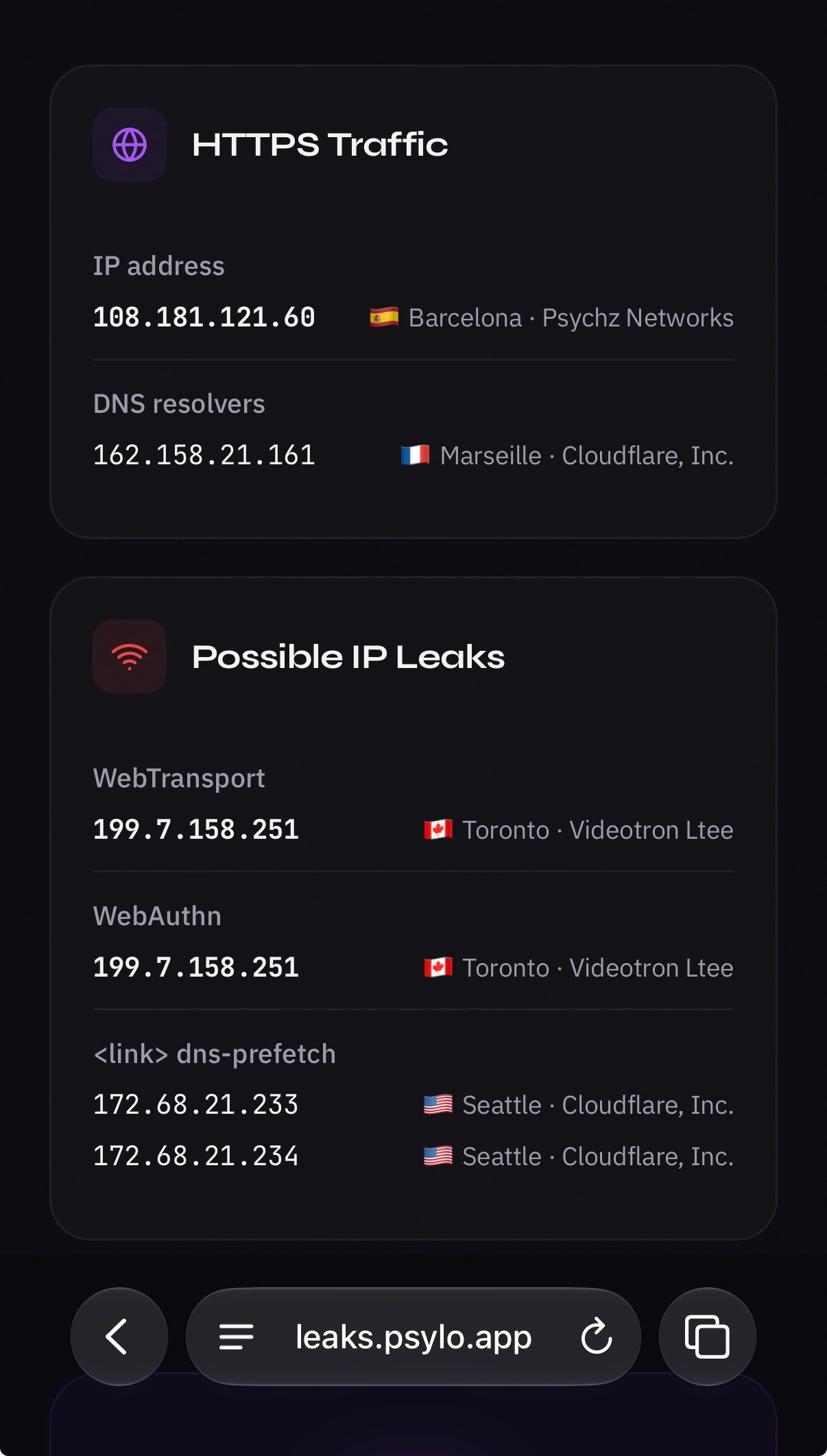
WebKit-based browsers on iOS and macOS can be built to route all web traffic through proxy servers. This is how all proxy browsers work on iOS, including iOS Tor browsers and our own browser, Psylo. Every network connection a web page makes is supposed to flow through the configured proxy, so websites only ever see the proxy’s IP address. We found three WebKit features that bypass the proxy configuration and send traffic directly from the device instead:
- DNS prefetching resolves hostnames through the device’s normal DNS path, which reveals the user’s real DNS servers instead of the proxy’s. Available since iOS 26.0.
- WebAuthn Related Origin Requests make the operating system’s credential service fetch a validation file directly from the device. This exposes the device’s real IP address. Available since iOS 18.0.
- WebTransport opens a direct HTTP/3 connection and bypasses the proxy, which also exposes the device’s real IP address. Available since iOS 26.4.
These leaks also impact Apple’s iCloud Private Relay. It must be noted that VPNs are not affected, since they tunnel the device’s entire network traffic at the system level.
We’ve reached out to the Tor Project and the developers of Onion Browser on iOS about these issues.
To test the leaks, you can visit our proof-of-concept website at leaks.psylo.app.
Fixed in Psylo 1.3.1: Psylo now blocks
dns-prefetchhints and disables WebTransport and WebAuthn by default. For websites that genuinely need these features, each one can be re-enabled through per-silo toggles. This explicit opt-in keeps the privacy trade-offs in the user’s hands. See Mitigations Introduced in Psylo 1.3.1 for details.
Background#
Proxy Configuration on iOS and macOS#
Introduced in iOS 17 and macOS 14, WKWebsiteDataStore.proxyConfigurations allows WebKit-based browsers route all of their own web traffic through proxy servers at the application level. This API is the foundation of proxy browsers on iOS: every network connection a web page makes is supposed to flow through the configured proxy, so websites only ever see the proxy’s IP address.
DNS Leak Reported by a Psylo User#
This investigation started with a bug report from a Psylo user who noticed DNS leaks when visiting only certain websites, and we immediately started looking into it. Psylo routes all traffic from each silo through the Mysk Private Proxy Network (or the user’s own configured custom proxy), so DNS queries should all originate from the proxy server and never from the device. It also seemed odd that this only affected some websites, and not all.
As we dug deeper, we found the source of the DNS leaks, plus two more leaks that actually reveal the device’s real IP address. All three leaks live in WebKit, where they bypass the proxy settings provided by WKWebsiteDataStore.proxyConfigurations. Since Apple’s App Store policy requires every iOS browser to use WebKit, any iOS browser that relies on this API for proxying is affected, including all iOS Tor browsers and Psylo. These leaks are also present in Apple’s iCloud Private Relay. VPNs, on the other hand, are not affected by these issues, since the device’s entire network traffic is tunneled through the VPN at the system level.
iCloud Private Relay#
iCloud Private Relay is Apple’s privacy feature for iCloud+ subscribers. When enabled, it proxies Safari’s (and only Safari’s) web traffic and DNS queries through a two-hop relay, designed so that no single party, not even Apple, can see both who you are and which sites you visit. As it turns out, all three leaks described in this article occur outside WebKit’s standard page-loading process, meaning Private Relay is susceptible to the same leaks.
1. DNS Prefetching#
DNS prefetching lets a website ask the browser to resolve a hostname before it’s needed. So when later it needs to connect to that hostname, the lookup is already done and the connection starts faster. This is done through a <link rel="dns-prefetch"> HTML tag.
When a page includes that tag, WebKit resolves the hostname through the device’s normal DNS path, regardless of any proxy set by the browser through WKWebsiteDataStore.proxyConfigurations. A page can embed unique per-visitor hostnames in these tags, then watch the queries arrive at its own authoritative DNS server from the visitor’s real network rather than the proxy’s.
This was the leak behind the original user report, and it explains why only some websites triggered it: without prefetch tags on the page, WebKit doesn’t perform this DNS lookup.
Private Relay doesn’t catch this one. It normally proxies Safari’s DNS queries, but these prefetch lookups skip it. The query reaches the authoritative server from the device’s real network even with Private Relay enabled.
Desktop Safari has supported
<link rel="dns-prefetch">since Safari 5, but iOS ignored it until iOS 26.0 (September 2025), when WebKit enabled it in the same change that removed iOS’s older, implicit speculative DNS prefetching (bug 285744, 290327@main; browser-compat data). That resolver had been rewritten the year before, to keep hostnames out of system logs during private browsing (bug 272190, 279199@main).
2. WebAuthn Related Origin Requests#
WebAuthn is the web standard behind passkeys. A passkey is normally bound to a single domain, but Related Origin Requests let an organization use one passkey across a small set of domains it owns.
To make that work, when a page requests a credential whose rpId differs from its own origin, the client first fetches https://<rpId>/.well-known/webauthn, a JSON file listing which origins may use that rpId.
That validation fetch doesn’t come from the browser’s network stack. WebKit hands WebAuthn ceremonies to the operating system’s credential service, which issues the HTTPS request itself, directly from the device and unaware of any proxy the host app configured. A page can set rpId to a host of its choosing, and the fetch fires even without user interaction: with mediation: "conditional" and no UI ever appears.
The same reasoning applies to iCloud Private Relay. Because the fetch is issued by the operating system’s credential service rather than by Safari, it never enters Private Relay’s proxied path. The destination server sees the device’s real IP address either way.
Apple announced the feature for iOS 18.0 / Safari 18.0 (September 2024) in WebKit Features in Safari 18.0. WebKit’s half of the plumbing landed earlier that year (bug 268426, 274592@main) and even shipped, inert, in iOS 17.4; the system component that performs the fetch only gained support in 18.0.
3. WebTransport#
WebTransport is a low-latency alternative to WebSocket. It runs over HTTP/3 and QUIC, offers multiple independent streams plus unreliable datagram delivery, and can fall back to HTTP/2 where QUIC is unavailable.
Calling new WebTransport(url) opens a QUIC connection straight from the device. WebKit builds the connection with its own network parameters and never offers it the session’s proxy, so the server sees the device’s real IP address instead of the proxy’s.
Private Relay doesn’t help here either. WebKit builds the connection outside the web traffic that Private Relay proxies, so a WebTransport server learns the device’s real IP address even with Private Relay enabled.
There is one exception: Onion Browser’s “Silver” security level configures WebKit with Lockdown Mode, which disables WebTransport entirely, so Onion Browser users at the Silver level are not affected by this particular leak.
First traces of the API appeared in 2023 (bug 260810, 267408@main) but sat disabled until December 2025, when it was switched on for platforms with sufficient Network.framework support (bug 303453, 303860@main). It shipped publicly in iOS 26.4 (March 2026); see WebKit Features for Safari 26.4 and the Safari 26.4 Release Notes.
Mitigations Introduced in Psylo 1.3.1#
We’ve addressed all three leaks in Psylo 1.3.1:
- Psylo blocks
dns-prefetchhints, so a page can no longer make your device resolve attacker-controlled hostnames. - WebTransport is disabled by default.
- WebAuthn is disabled by default.
Passkeys and WebTransport have legitimate uses, so both can be re-enabled at any time through per-silo toggles. This keeps Psylo leak-free out of the box, while users who need one of these features on a given site can opt in explicitly, with a clear understanding of the trade-off.